Inventory Management in Custom ERP Solution by Bhavantu Software
Inventory can quietly become one of the biggest operational challenges as a business grows.
Too much stock ties up working capital. Too little stock can interrupt operations. Add multiple godowns, stock transfers, different item categories, reorder levels, and frequent adjustments, and keeping everything accurate becomes difficult with spreadsheets or disconnected systems.
Bhavantu Software’s Custom ERP Solution includes an Inventory Module designed to give businesses better control over their stock and warehouse operations. From creating item masters to tracking stock movement, valuation, and reorder levels, the module brings inventory information into one connected system.
More importantly, the inventory system can be customized around the way your business manages its products, warehouses, and stock processes.
What Does the Inventory Module Actually Solve?
Inventory management is not simply about knowing how many items are available.
Businesses also need to know:
- Where the stock is located
- When stock was received or transferred
- Which items are moving quickly
- Which items are sitting idle
- When stock needs to be replenished
- How much inventory is worth
- How stock movements affect accounting
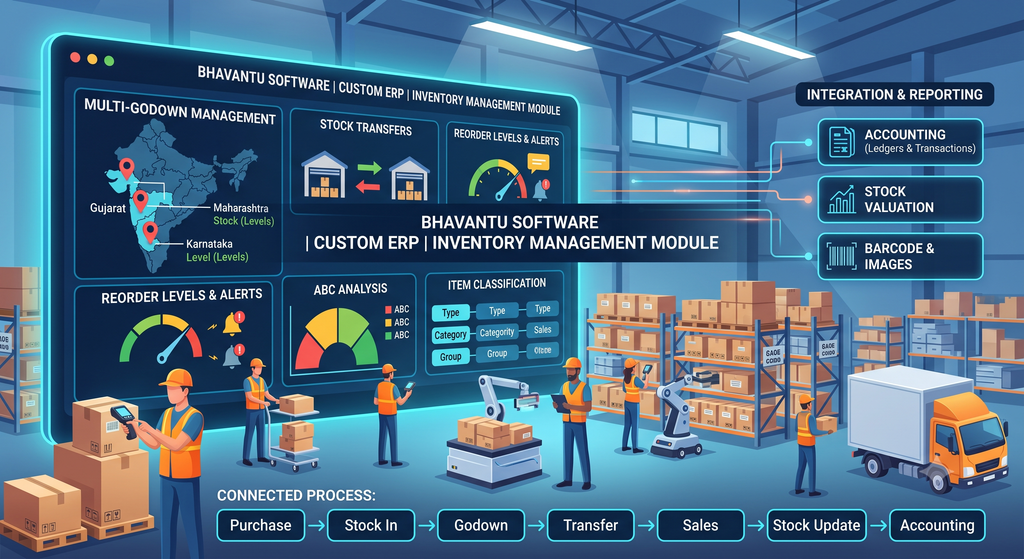
Bhavantu’s Custom ERP connects these activities so businesses can maintain a clearer and more reliable view of their inventory.
Manage Stock Across Multiple Godowns
Businesses operating from multiple warehouses or godowns often face difficulty maintaining accurate location-wise stock information.
The ERP supports multiple godown management, allowing businesses to organize inventory according to their warehouse structure.
This makes it easier to understand where particular items are stored and manage stock across different locations.
For businesses with multiple branches or warehouses, this centralized approach can also reduce unnecessary duplication of inventory records.
Move Stock Where It Is Needed
Stock Transfer
Stock doesn’t always remain in one location.
It may need to move from one godown to another, from one branch to another, or between different operational locations.
The Stock Transfer functionality helps businesses record these movements systematically, keeping inventory information updated as stock moves between locations.
Correct Inventory Records When Things Change
Inventory Adjustment
Physical stock and system stock don’t always match.
There can be damaged items, shortages, excess quantities, counting differences, or other situations that require an adjustment.
The Inventory Adjustment feature provides a structured way to record such changes instead of making unexplained manual changes to stock figures.
This helps maintain better inventory accuracy and a clearer transaction history.
Build an Item Structure That Matches Your Business
Item Types, Categories, Groups & UOM
Different businesses manage hundreds or even thousands of items.
Without a proper structure, finding and analyzing inventory information becomes difficult.
The ERP allows businesses to create and organize:
- Item Types
- Item Categories
- Item Groups
- Units of Measurement (UOM)
- Individual Items
This classification makes inventory easier to search, manage, and report.
It also provides a foundation for more detailed inventory analysis.
Know Your Stock Position
Item Stock Statements
Knowing the current stock position is essential for purchasing and operational planning.
Item Stock Statements provide information about inventory movement and availability, helping users understand how stock changes over time.
Instead of checking multiple records manually, teams can access relevant stock information from the ERP.
Identify Fast- and Slow-Moving Items
ABC Analysis
Not every inventory item has the same importance.
Some items contribute significantly to business activity, while others may have relatively low movement or value.
The ERP supports ABC Analysis, helping businesses categorize inventory based on its importance or value.
This can help management focus attention on the items that matter most and improve inventory planning.
Inventory and Accounts Should Work Together
Inventory and accounting are closely connected.
When stock moves, purchases are made, or inventory is adjusted, these activities can have financial implications.
Bhavantu’s Custom ERP can integrate inventory processes with accounting functions such as:
- Stock Journal
- Stock Transfer
- Purchase Transactions
- Sales Transactions
- Inventory Valuation
- Financial Reporting
This reduces the need to maintain separate inventory and accounting records and creates a more connected flow of business information.
Barcode Printing & Item Images
For businesses handling a large number of products, identifying items manually can take unnecessary time.
Bhavantu’s ERP supports barcode printing and item images, helping users identify and manage inventory more efficiently.
Visual item information and barcode-based identification can be particularly useful in warehouse environments where speed and accuracy matter.
Understand the Value of Your Inventory
Stock Valuation & Summary Reports
Knowing the quantity of stock is only part of inventory management.
Businesses also need to understand the value of the inventory they hold.
Stock valuation and summary reports help management review inventory information from both quantity and value perspectives.
This can support financial planning, purchasing decisions, and overall inventory control.
Don’t Wait Until Stock Runs Out
Minimum Stock & Reorder Levels
Stock shortages can interrupt business operations and create unnecessary delays.
Bhavantu’s Custom ERP allows businesses to define minimum stock levels and reorder levels for relevant items.
When inventory approaches predefined levels, teams can identify items that may require replenishment and plan purchases accordingly.
This supports a more proactive approach to inventory management.
What Changes When Inventory Is Connected?
The real advantage of an ERP is not just having an inventory screen.
It is having inventory connected to the rest of the business.
A typical flow can look like:
Purchase → Stock Inward → Godown → Stock Movement → Sales/Issue → Stock Update → Accounting
This creates a continuous flow of information instead of separate records maintained by different teams.
The result is better visibility and less dependency on manual coordination.
Built for Your Inventory Process, Not Someone Else’s
Every business handles inventory differently.
You may have your own:
- Warehouse structure
- Item classification
- Stock approval process
- Transfer procedures
- Reorder rules
- Barcode requirements
- Valuation method
- Reporting format
A generic ERP may provide basic inventory functionality but still require your team to work around its limitations.
With Bhavantu’s Custom ERP Solution, inventory workflows, reports, dashboards, and business rules can be adapted to your requirements.
That’s the difference between simply buying ERP software and building an ERP around your business.
Why Bhavantu Software?
Bhavantu Software focuses on creating practical ERP solutions that help businesses reduce manual work and gain better control over their operations.
Our Custom ERP approach provides:
Flexible Configuration
Set up inventory structures according to your business requirements.
Connected Modules
Inventory can work alongside accounting, purchase, sales, and other ERP functions.
Business Intelligence
Convert inventory information into useful reports and management insights.
Scalable Operations
Support additional godowns, branches, users, and inventory as your business grows.
Custom Reporting
Create reports based on the information your management team actually needs.
User-Friendly Experience
Keep everyday inventory activities simple for warehouse and office teams.
Where We Serve
Bhavantu Software provides Custom ERP Solutions to businesses across India, including Gujarat, Maharashtra, Rajasthan, Punjab, Haryana, Uttar Pradesh, Madhya Pradesh, Karnataka, Telangana, Tamil Nadu, Kerala, Odisha, West Bengal, Assam, Bihar, Andhra Pradesh, and many other regions.
Our customizable ERP approach allows us to support businesses with different inventory structures, industries, and operational requirements.
Frequently Asked Questions
What is Inventory Management in Custom ERP?
It is an ERP-based system for managing stock, item masters, warehouses, transfers, adjustments, valuation, and inventory reporting within a centralized platform.
Can the ERP manage multiple godowns?
Yes. Bhavantu’s Custom ERP supports multiple godown management and can be configured according to your warehouse structure.
Can I create different item categories and groups?
Yes. Businesses can create item types, categories, groups, UOMs, and individual item records according to their requirements.
Does the ERP support stock transfers?
Yes. Stock Transfer functionality allows businesses to record movement of inventory between relevant locations.
What is ABC Analysis in inventory management?
ABC Analysis helps classify inventory according to its importance or value, allowing businesses to focus inventory control efforts where they can have the greatest impact.
Can inventory be connected with accounting?
Yes. The inventory module can be integrated with accounting functions, including stock journals, stock transfers, purchases, sales, and inventory valuation.
Can I set minimum stock and reorder levels?
Yes. Minimum stock and reorder levels can be configured to help businesses identify inventory that may need replenishment.
Can inventory reports be customized?
Absolutely. As part of a Custom ERP Solution, inventory reports, dashboards, and other workflows can be adapted to your business requirements.
Take Control of Your Inventory
Inventory problems rarely come from one single issue. They usually build up through small gaps, an unrecorded transfer, an incorrect stock adjustment, an overlooked reorder level, or information sitting in a different system.
A connected ERP can bring these activities together.
Bhavantu Software’s Inventory Module helps businesses manage stock, godowns, item structures, transfers, adjustments, valuation, and reporting from one centralized system.
And because every business has its own way of managing inventory, our Custom ERP Solution can be configured around your processes rather than forcing your team to follow a fixed template.
If you’re looking to improve inventory visibility, reduce manual work, and build a more connected business management system, contact Bhavantu Software to discuss your requirements.
Build an inventory system that works the way your business works.
For more details and a personalized consultation, visit our Products!
Contact No: 9099825657
Email: sales@bhavantusoftware.com